09: Visualization
See Bonus for advanced topics:
- Advanced time series decomposition and seasonal analysis
- Time series forecasting with ARIMA and exponential smoothing
- Period arithmetic and fiscal year handling
- High-frequency data analysis and tick data
- Custom frequency classes and time zone complexities
Fun fact: Time series analysis is like being a detective for data - you’re looking for patterns, trends, and clues that reveal the story of how things change over time. It’s the difference between knowing what happened and understanding why it happened.
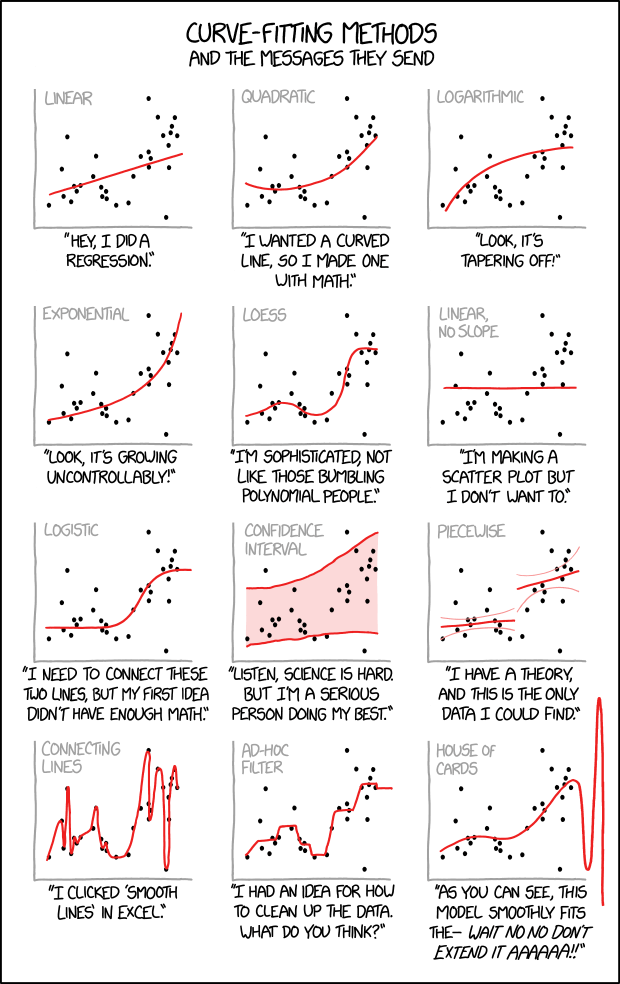
“Cauchy-Lorentz: ‘Something alarmingly mathematical is happening, and you should probably stop.’” - A reminder that not every pattern in time series data is meaningful, and overfitting is always lurking.
Time series analysis is the art of understanding temporal patterns in data. This lecture covers the essential tools for time series analysis: datetime handling, resampling and frequency conversion, rolling window operations, and time series indexing and selection.
Pro tip: Time series analysis is 90% datetime wrangling, 5% actual analysis, and 5% swearing at timezone conversions. Master these datetime tools and you’ll be ahead of 90% of data scientists.
Learning Objectives:
- Master datetime data types and parsing
- Perform time series indexing and selection
- Use resampling and frequency conversion
- Apply rolling window operations
- Understand exponentially weighted functions
- Handle basic time zone operations
Understanding Time Series Data
Section titled “Understanding Time Series Data”Reality check: Time series data is everywhere in health and medical research - patient vital signs, clinical trial measurements, disease surveillance, environmental monitoring. Understanding how to work with temporal data is essential for any data scientist in the life sciences.
Time series data is characterized by observations collected over time, where the order and timing of observations matter. Unlike cross-sectional data, time series data has a natural temporal structure that we can exploit for analysis.
Types of Time Series
Section titled “Types of Time Series”“Time series data comes in many flavors - some are as regular as a Swiss watch, others as unpredictable as a toddler’s nap schedule. The key is knowing which one you’re dealing with!”
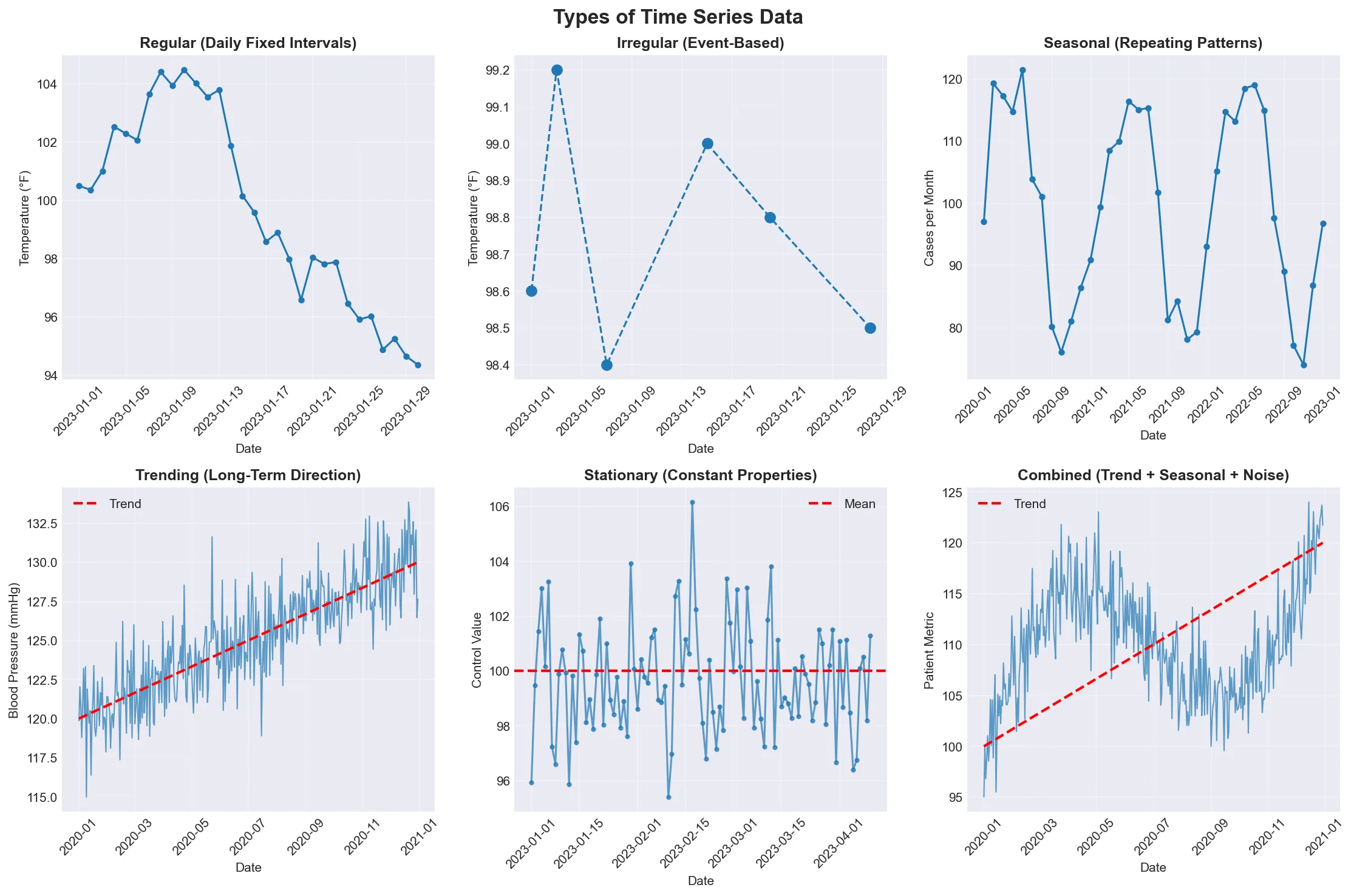
Visual guide showing the different types of time series data. Notice how regular series tick along like clockwork, while irregular series jump around like a medical appointment schedule.
| Type | Description | Example |
|---|---|---|
| Regular | Fixed intervals (daily, hourly, monthly) | Daily patient temperature readings |
| Irregular | Variable intervals (event-based) | Clinical visit dates |
| Seasonal | Patterns repeat over time | Monthly flu case counts |
| Trending | Long-term direction | Long-term blood pressure trends |
| Stationary | Statistical properties don’t change | Laboratory control measurements |
| Combined | Multiple components (trend + seasonal + noise) | Real-world medical data with all patterns |
Date and Time Data Types
Section titled “Date and Time Data Types”Think of datetime objects as the Swiss Army knife of temporal data - they can represent any moment in time with precision down to microseconds, and pandas makes them incredibly powerful for analysis.
Python datetime Module
Section titled “Python datetime Module”The Python standard library provides datetime for working with dates and times. Understanding these basics is essential before moving to pandas. Think of it as learning to walk before you can run - except in this case, walking is parsing dates and running is resampling multi-site clinical trial data.
Reference:
| Function | Description |
|---|---|
datetime.now() | Current date and time |
datetime(year, month, day) | Create specific date |
datetime.strptime(string, format) | Parse string to datetime |
datetime.strftime(format) | Format datetime to string |
timedelta(days=1) | Time differences |
Example:
from datetime import datetime, timedelta
# Current timenow = datetime.now()print(f"Current time: {now}")
# Specific date (patient birth date)birthday = datetime(1990, 5, 15)print(f"Birth date: {birthday}")
# String parsing (lab result timestamp)date_str = "2023-12-25 14:30:00"parsed_date = datetime.strptime(date_str, "%Y-%m-%d %H:%M:%S")print(f"Parsed date: {parsed_date}")
# String formattingformatted = parsed_date.strftime("%B %d, %Y at %I:%M %p")print(f"Formatted: {formatted}")
# Time differences (age calculation)time_diff = now - birthdayprint(f"Age in days: {time_diff.days}")
pandas DatetimeIndex
Section titled “pandas DatetimeIndex”pandas provides powerful datetime functionality through DatetimeIndex, which is optimized for time series operations.
Reference:
| Function | Description |
|---|---|
pd.to_datetime() | Convert to datetime |
pd.date_range() | Create date range |
pd.DatetimeIndex() | Create datetime index |
df.set_index('date') | Set datetime index |
df.index | Access datetime index |
Example:
# Convert to datetime (lab test dates)date_strings = ['2023-01-01', '2023-01-02', '2023-01-03']dates = pd.to_datetime(date_strings)print("Converted dates:")print(dates)
# Create date range (daily patient monitoring)date_range = pd.date_range('2023-01-01', periods=10, freq='D')print("\nDate range:")print(date_range)
# Create DataFrame with datetime index (vital signs)df = pd.DataFrame({    'heart_rate': np.random.randint(60, 100, 10),    'blood_pressure': np.random.randint(90, 140, 10)}, index=date_range)print("\nDataFrame with datetime index:")print(df.head())
Important Note: When setting a datetime column as the index for DataFrames with multiple rows per date (e.g., multiple patients measured on the same date), pandas may have trouble with date range selection using .loc.
Prerequisites: First, convert your date column to datetime and set it as the index:
df['date'] = pd.to_datetime(df['date']) # Convert to datetimedf = df.set_index('date') # Set as indexThe Problem: If your DataFrame has multiple patients with measurements on the same date, the index might look like [2023-01-01, 2023-01-02, 2023-01-01, 2023-01-03, ...] - notice dates aren’t in order. Pandas can’t reliably slice date ranges on non-monotonic indexes.
The Solution: Sort the index: df = df.sort_index(). This makes the index monotonic (non-decreasing), so all rows with the same date are grouped together: [2023-01-01, 2023-01-01, 2023-01-02, 2023-01-03, ...]. Now date range selection like df.loc['2023-01':'2023-03'] works correctly.
Date Range Generation
Section titled “Date Range Generation”pandas provides flexible date range generation for creating regular time series. Want every Monday? Got it. Business days only? No problem. Last Friday of each month? Absolutely. Third Wednesday? Why not! pandas can generate pretty much any date pattern you can imagine - and some you probably can’t.
Reference:
| Function | Frequency Code | Description |
|---|---|---|
pd.date_range(start, end, freq='D') | 'D' | Daily (calendar) |
pd.bdate_range(start, end) | 'B' | Business days only |
pd.date_range(freq='W-MON') | 'W-MON' | Weekly on Monday |
pd.date_range(freq='MS') | 'MS' | Month start |
pd.date_range(freq='QS') | 'QS' | Quarter start |
pd.date_range(freq='H') | 'H' | Hourly |
Note: Both ‘H’ and ‘h’ work for hourly frequency, but ‘H’ is the canonical form.
Example:
# Different date range types for clinical dataprint("Daily range (vital signs):")daily = pd.date_range('2023-01-01', '2023-01-10', freq='D')print(daily)
print("\nBusiness days only (clinic visits):")business = pd.bdate_range('2023-01-01', '2023-01-10')print(business)
print("\nWeekly range (Mondays - weekly checkups):")weekly = pd.date_range('2023-01-01', '2023-03-01', freq='W-MON')print(weekly)
print("\nMonthly range (monthly lab tests):")monthly = pd.date_range('2023-01-01', '2023-12-01', freq='MS')print(monthly)
Frequency Inference
Section titled “Frequency Inference”You can infer the frequency of a time series and convert between frequencies.
Reference:
| Function | Description |
|---|---|
pd.infer_freq(ts.index) | Infer frequency from time series |
ts.asfreq(freq) | Convert to specific frequency |
ts.resample(freq).asfreq() | Resample and convert frequency |
Example:
# Create time series with inferred frequencydates = pd.date_range('2023-01-01', periods=100, freq='D')ts = pd.Series(np.random.randn(100), index=dates)
# Infer frequencyfreq = pd.infer_freq(ts.index)print(f"Inferred frequency: {freq}")
# Convert to different frequency (daily to weekly)ts_weekly = ts.asfreq('W')print(f"Weekly frequency: {pd.infer_freq(ts_weekly.index)}")
Shifting and Lagging
Section titled “Shifting and Lagging”Shifting allows you to create lagged or leading versions of your time series, essential for analyzing changes over time.
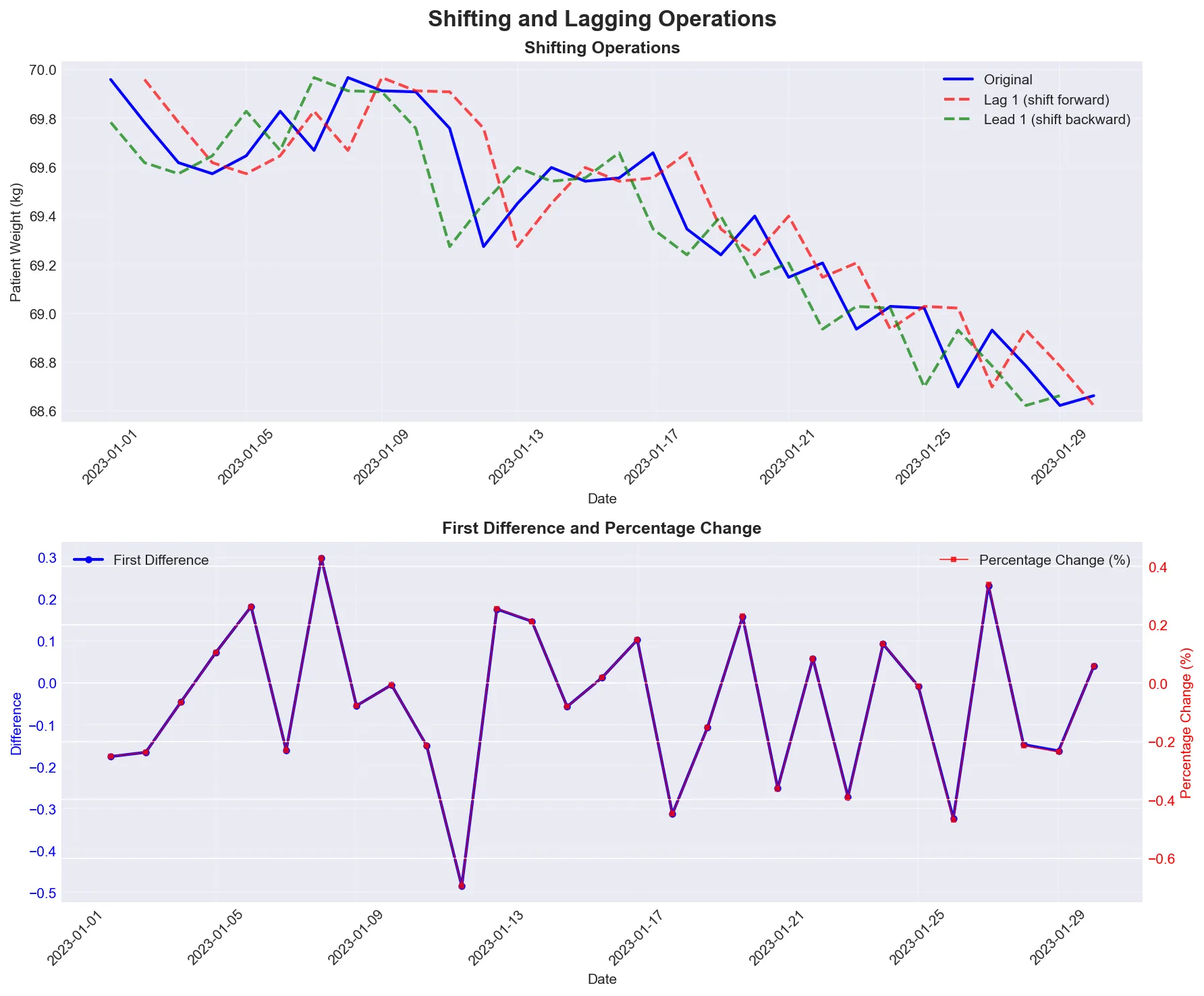
Visual demonstration of shifting operations showing lag (looking back), lead (looking ahead), and differences (day-to-day changes).
Reference:
| Function | Description |
|---|---|
ts.shift(1) | Shift by 1 period (lag) |
ts.shift(-1) | Shift by -1 period (lead) |
ts.diff() | First difference |
ts.pct_change() | Percentage change |
ts.shift(1, freq='D') | Shift by 1 day (with timestamp) |
Example:
# Create sample time series (patient weight measurements)dates = pd.date_range('2023-01-01', periods=10, freq='D')ts = pd.Series([70.5, 70.8, 70.2, 71.0, 70.9, 71.2, 71.5, 71.3, 71.8, 71.6], index=dates)
# Shifting operationsts['lag_1'] = ts.shift(1)  # Previous dayts['lead_1'] = ts.shift(-1)  # Next dayts['diff'] = ts.diff()  # First difference (day-to-day change)ts['pct_change'] = ts.pct_change()  # Percentage change
print("Time series with shifts:")print(ts[['lag_1', 'diff', 'pct_change']].head())
LIVE DEMO!
Section titled “LIVE DEMO!”Time Series Indexing and Selection
Section titled “Time Series Indexing and Selection”Basic Time Series Selection
Section titled “Basic Time Series Selection”pandas provides intuitive ways to select data from time series using string-based indexing. You can write “2023” and pandas knows you mean “all of 2023”.
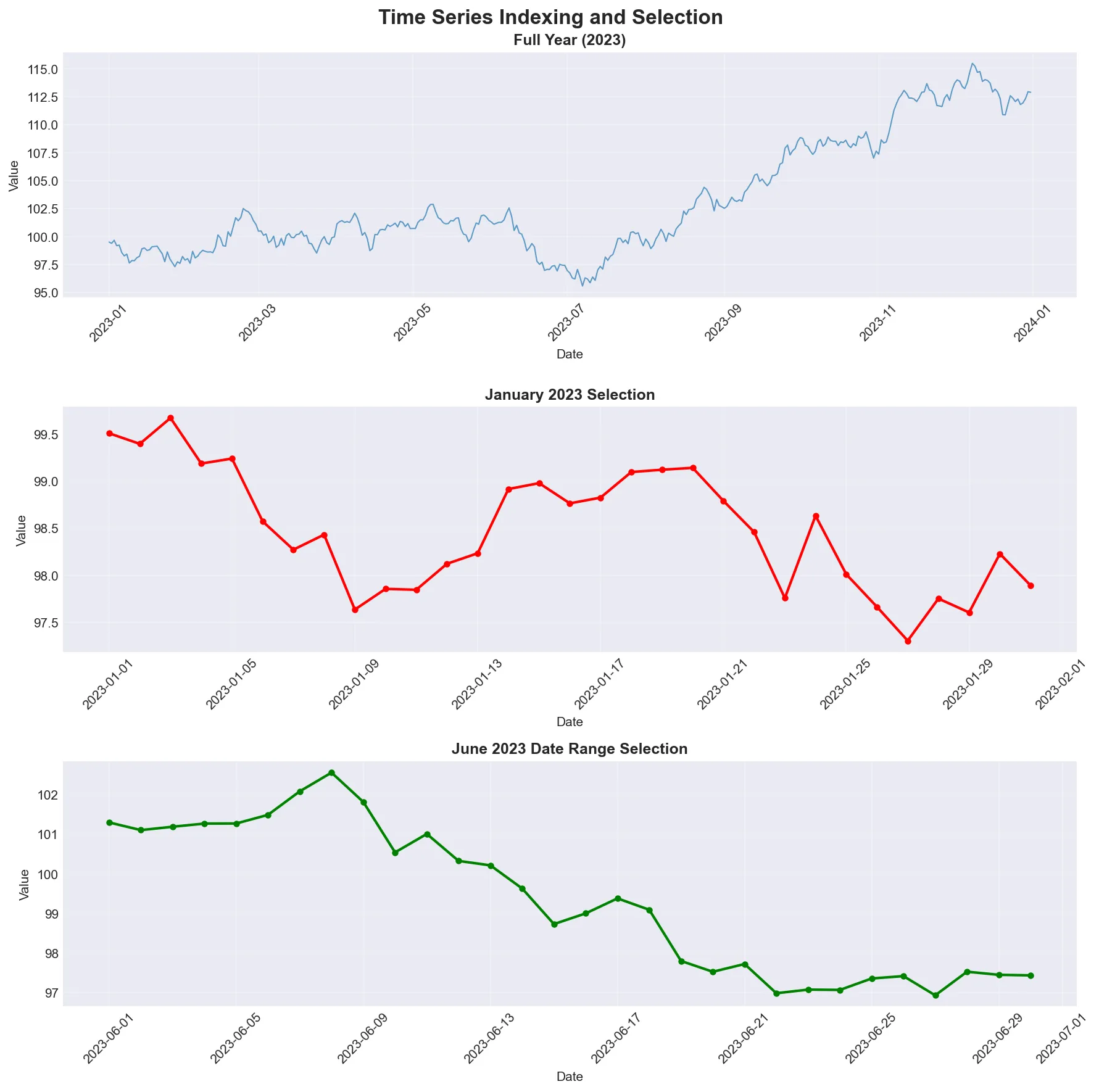
Examples of time-based selection showing how to slice data by year, month, or date range. Notice how pandas interprets string dates like a human would.
Reference:
| Operation | Description |
|---|---|
ts['2023-01-01'] | Select specific date |
ts['2023-01-01':'2023-01-31'] | Select date range |
ts['2023'] | Select entire year |
ts['2023-01'] | Select specific month |
ts.loc['2023-01-01'] | Label-based selection |
ts.iloc[0:10] | Position-based selection |
Example:
# Create sample time series (year of patient data)dates = pd.date_range('2023-01-01', periods=365, freq='D')values = np.cumsum(np.random.randn(365)) + 100ts = pd.Series(values, index=dates)
# Select specific dateprint("January 1, 2023:")print(ts['2023-01-01'])
# Select date rangeprint("\nJanuary 2023:")print(ts['2023-01-01':'2023-01-31'].head())
# Select entire yearprint("\n2023 data shape:")print(ts['2023'].shape)
# Select specific monthprint("\nJanuary 2023:")print(ts['2023-01'].head())
Advanced Time Series Selection
Section titled “Advanced Time Series Selection”For time series with time components, you can select based on time of day. This is useful for selecting data from business hours or specific times of day.
Reference:
| Function | Description |
|---|---|
ts.between_time('09:00', '17:00') | Select time range |
ts.at_time('12:00') | Select specific time |
ts.loc[:start_date + pd.Timedelta(days=9)] | First 10 days |
ts.loc[end_date - pd.Timedelta(days=9):] | Last 10 days |
ts.truncate(before='2023-06-01') | Truncate before date (requires sorted index) |
ts.truncate(after='2023-06-30') | Truncate after date (requires sorted index) |
Example:
# Create hourly time series (ICU monitoring)hourly_dates = pd.date_range('2023-01-01', periods=24*7, freq='H')hourly_values = np.random.randn(24*7) + 100ts_hourly = pd.Series(hourly_values, index=hourly_dates)
# Select business hours (9 AM to 5 PM)business_hours = ts_hourly.between_time('09:00', '17:00')print("Business hours data:")print(business_hours.head())
# Select specific time (noon readings)noon_data = ts_hourly.at_time('12:00')print("\nNoon data:")print(noon_data.head())
# Select first and last periods using .locprint("\nFirst 3 days:")first_3_days = ts_hourly.loc[:ts_hourly.index.min() + pd.Timedelta(days=2)]print(first_3_days.head())
print("\nLast 3 days:")last_3_days = ts_hourly.loc[ts_hourly.index.max() - pd.Timedelta(days=2):]print(last_3_days.head())
Resampling and Frequency Conversion
Section titled “Resampling and Frequency Conversion”Resampling is like changing the lens on your camera - you can zoom in to see more detail (higher frequency) or zoom out to see the big picture (lower frequency).
Resampling converts time series from one frequency to another. Downsampling aggregates higher frequency data to lower frequency (e.g., daily to monthly). Upsampling converts lower frequency to higher frequency (e.g., monthly to daily), often introducing missing values.
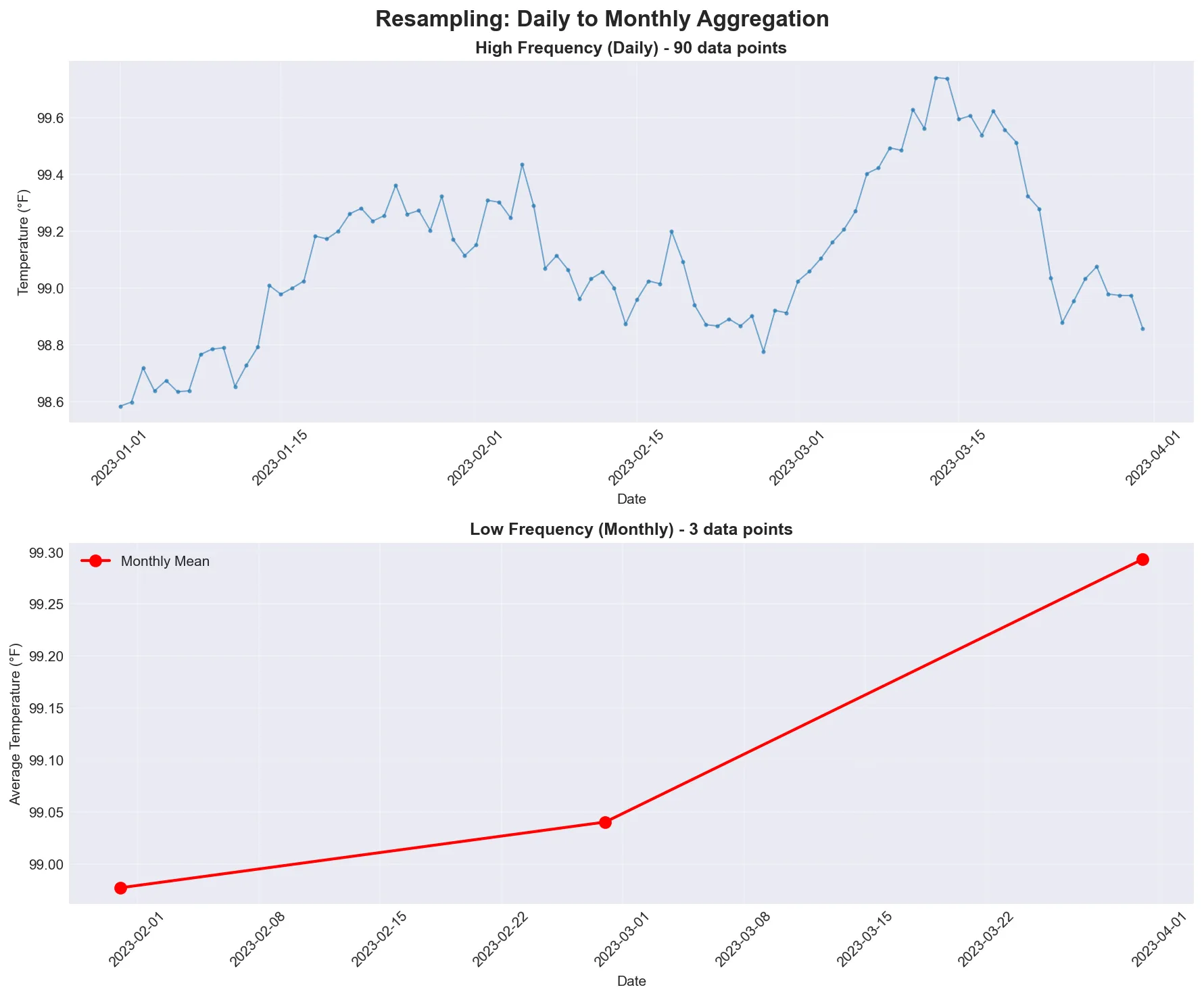
Visual comparison showing daily data (high frequency, many points) being resampled to monthly data (low frequency, fewer points). Notice how the monthly view smooths out daily fluctuations.
Basic Resampling
Section titled “Basic Resampling”The resample() method is the workhorse for frequency conversion, similar to groupby() but for time intervals.
Reference:
| Frequency Code | Description |
|---|---|
ts.resample('D') | Daily resampling |
ts.resample('W') | Weekly resampling |
ts.resample('ME') | Monthly resampling (Month End) |
ts.resample('Q') | Quarterly resampling |
ts.resample('A') | Annual resampling |
ts.resample('H') | Hourly resampling |
Example:
# Create daily time series (patient vital signs)daily_dates = pd.date_range('2023-01-01', periods=30, freq='D')daily_values = np.cumsum(np.random.randn(30)) + 100ts_daily = pd.Series(daily_values, index=daily_dates)
# Resample to different frequenciesprint("Original daily data shape:", ts_daily.shape)
# Weekly resampling (average weekly values)weekly = ts_daily.resample('W').mean()print("Weekly resampled shape:", weekly.shape)print("Weekly data:")print(weekly.head())
# Monthly resampling (average monthly values)monthly = ts_daily.resample('ME').mean()  # 'ME' = Month Endprint("\nMonthly resampled shape:", monthly.shape)print("Monthly data:")print(monthly.head())
Resampling with Different Aggregations
Section titled “Resampling with Different Aggregations”You can apply various aggregation functions when resampling, just like with groupby(). The syntax is the same, but instead of grouping by categories, you’re grouping by time intervals.
Important Note: When resampling DataFrames that contain non-numeric columns (like patient IDs or category labels), you’ll get an error if you try to aggregate them with numeric functions like mean(). Use df.select_dtypes(include=[np.number]) to select only numeric columns before resampling, or specify which columns to aggregate in .agg().
Reference:
| Function | Description |
|---|---|
ts.resample('D').mean() | Mean aggregation |
ts.resample('D').sum() | Sum aggregation |
ts.resample('D').max() | Maximum aggregation |
ts.resample('D').min() | Minimum aggregation |
ts.resample('D').std() | Standard deviation |
ts.resample('D').agg(['mean', 'std', 'min', 'max']) | Multiple aggregations |
Example:
# Create sample data with multiple columns (patient metrics)df = pd.DataFrame({    'temperature': np.random.normal(98.6, 0.5, 365),    'heart_rate': np.random.randint(60, 100, 365)}, index=pd.date_range('2023-01-01', periods=365, freq='D'))
# Different resampling methodsprint("Daily to weekly resampling:")weekly_stats = df.resample('W').agg({    'temperature': ['mean', 'std', 'min', 'max'],    'heart_rate': 'mean'})print(weekly_stats.head())
# Custom resampling functiondef custom_agg(series):    return pd.Series({        'mean': series.mean(),        'std': series.std(),        'range': series.max() - series.min(),        'count': len(series)    })
print("\nCustom aggregation:")custom_stats = df['temperature'].resample('ME').apply(custom_agg)print(custom_stats.head())
LIVE DEMO!
Section titled “LIVE DEMO!”
Rolling Window Operations
Section titled “Rolling Window Operations”Rolling window functions compute statistics over a fixed-size window that moves through the time series. This is useful for smoothing noisy data and identifying trends.
Basic Rolling Operations
Section titled “Basic Rolling Operations”The rolling() method creates a rolling window object that can be used with various aggregation functions.
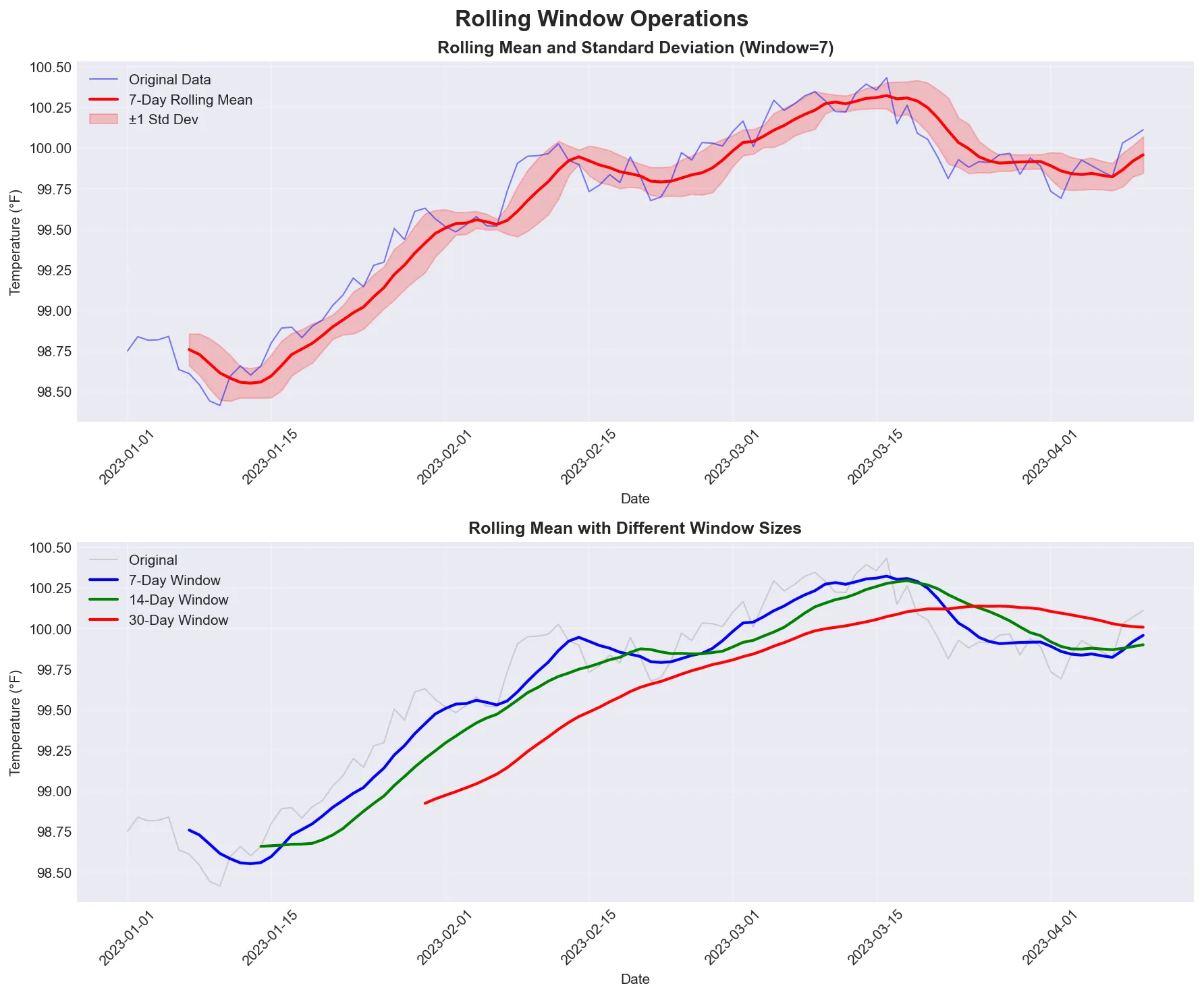
Demonstration of rolling window operations showing how a 7-day window smooths out daily fluctuations while preserving the underlying trend. The shaded area shows the standard deviation - wider means more variability, narrower means more consistent.
Reference:
| Function | Description |
|---|---|
ts.rolling(window=5) | 5-period rolling window |
ts.rolling(window=5).mean() | Rolling mean |
ts.rolling(window=5).std() | Rolling standard deviation |
ts.rolling(window=5).sum() | Rolling sum |
ts.rolling(window=5).min() | Rolling minimum |
ts.rolling(window=5).max() | Rolling maximum |
Example:
# Create sample time series (patient temperature over time)dates = pd.date_range('2023-01-01', periods=100, freq='D')values = 98.6 + np.cumsum(np.random.randn(100) * 0.1)  # Temperature with driftts = pd.Series(values, index=dates)
# Rolling statistics (7-day rolling window)ts['rolling_mean'] = ts.rolling(window=7).mean()ts['rolling_std'] = ts.rolling(window=7).std()ts['rolling_min'] = ts.rolling(window=7).min()ts['rolling_max'] = ts.rolling(window=7).max()
print("Time series with rolling statistics:")print(ts[['rolling_mean', 'rolling_std']].head(10))
Advanced Rolling Operations
Section titled “Advanced Rolling Operations”Rolling windows can be centered, have minimum periods, and use custom functions. Centered windows look both backward and forward from each point. Minimum periods allow calculations even before you have a full window.
Reference:
| Function | Description |
|---|---|
ts.rolling(window=5, center=True) | Centered rolling window |
ts.rolling(window=5, min_periods=3) | Minimum periods required |
ts.rolling(window=5).quantile(0.5) | Rolling median |
ts.rolling(window=5).apply(custom_func) | Custom rolling function |
ts.expanding() | Expanding window (from start to current) |
ts.ewm(span=5) | Exponentially weighted moving average |
Example:
# Advanced rolling operationsts['centered_mean'] = ts.rolling(window=7, center=True).mean()ts['expanding_mean'] = ts.expanding().mean()  # Mean from start to currentts['ewm_mean'] = ts.ewm(span=7).mean()  # Exponentially weighted
# Custom rolling functiondef rolling_range(series):    return series.max() - series.min()
ts['rolling_range'] = ts.rolling(window=7).apply(rolling_range)
print("Advanced rolling statistics:")print(ts[['centered_mean', 'expanding_mean', 'ewm_mean']].head(10))
Exponentially Weighted Functions
Section titled “Exponentially Weighted Functions”Exponentially weighted functions give more weight to recent observations, making them more responsive to recent changes.
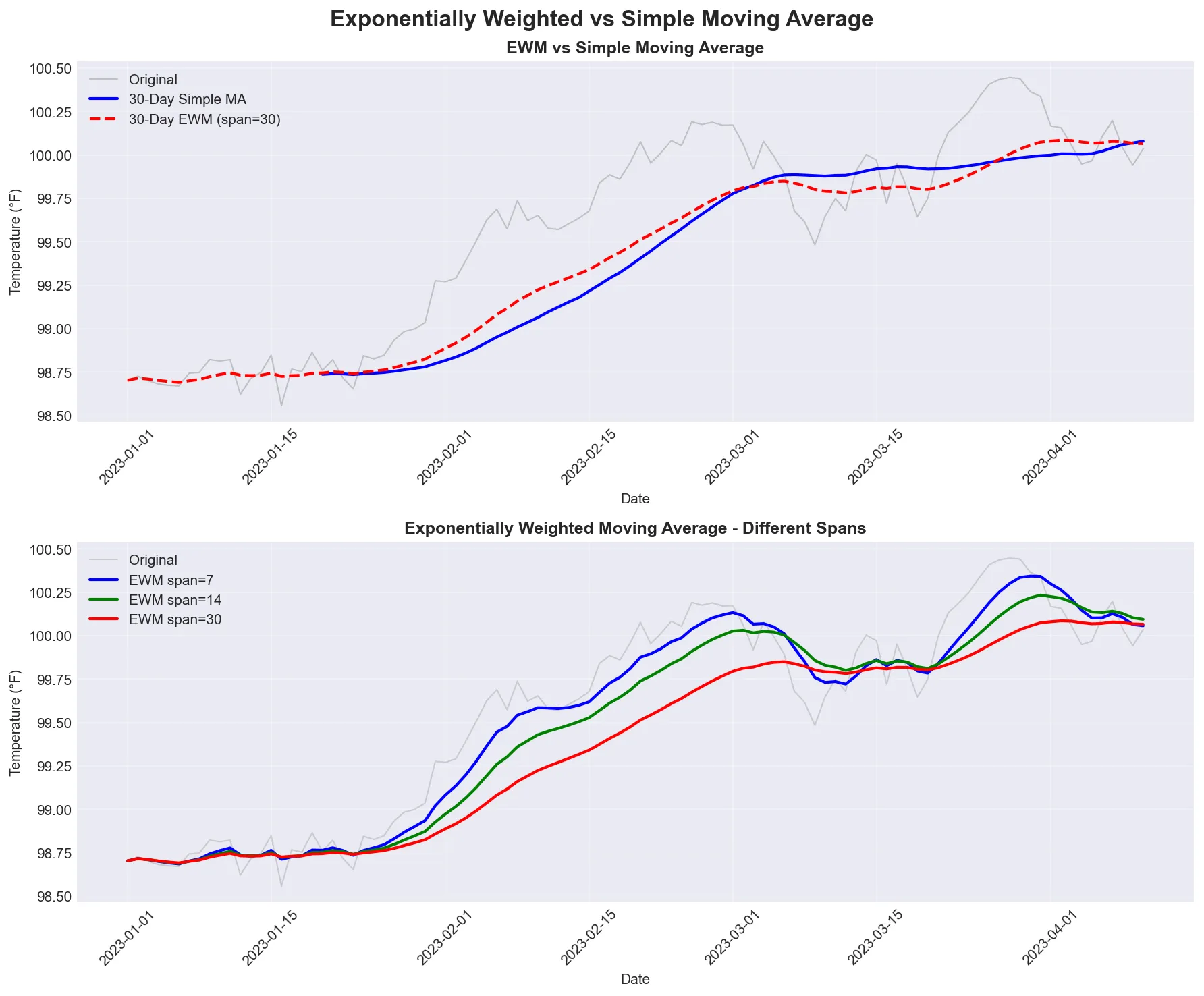
Comparison of exponentially weighted moving average (EWM) with simple moving average. Notice how EWM responds faster to recent changes.
Reference:
| Function | Description |
|---|---|
ts.ewm(span=5).mean() | Exponentially weighted moving average |
ts.ewm(alpha=0.3).mean() | EWM with alpha parameter |
ts.ewm(halflife=2).mean() | EWM with half-life |
ts.ewm(span=5).std() | Exponentially weighted standard deviation |
Example:
# Create sample time series (patient blood pressure)dates = pd.date_range('2023-01-01', periods=50, freq='D')ts = pd.Series(np.cumsum(np.random.randn(50)) + 120, index=dates)
# Exponentially weighted functionsts['ewm_mean'] = ts.ewm(span=5).mean()ts['ewm_std'] = ts.ewm(span=5).std()ts['ewm_alpha'] = ts.ewm(alpha=0.3).mean()
print("Time series with EWM functions:")print(ts[['ewm_mean', 'ewm_std']].head(10))
“You can’t fall off the bell curve if there’s no bell curve.” - A reminder that time series forecasting, especially during unprecedented events, carries significant uncertainty. Always be honest about prediction intervals.
Time Zone Handling
Section titled “Time Zone Handling”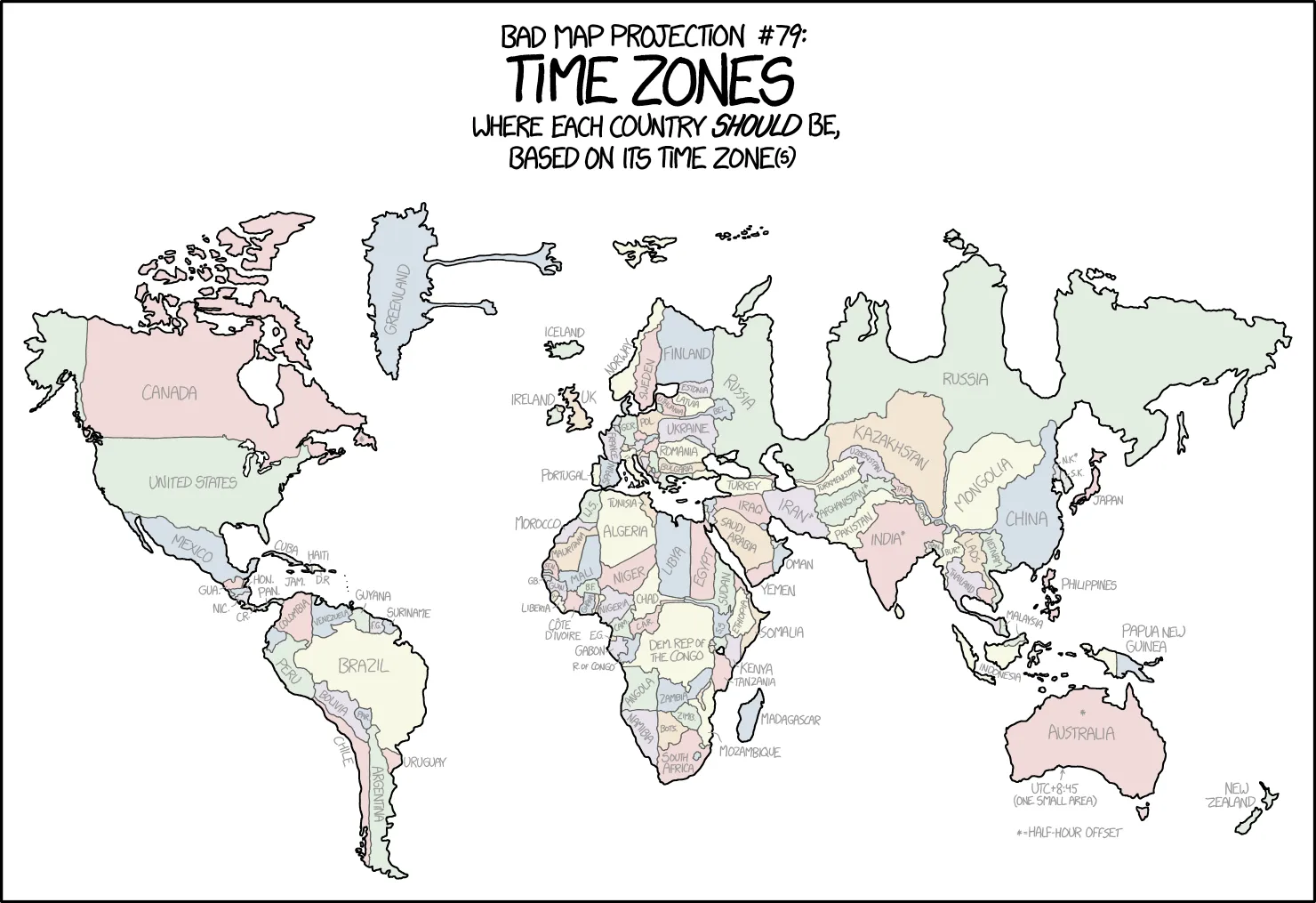
“I find it hard to believe that a time zone can be a real thing.” - A relatable sentiment when dealing with time zone conversions.
Basic Time Zone Operations
Section titled “Basic Time Zone Operations”pandas provides time zone localization and conversion for timezone-aware datetime objects.
Best Practice: When working with time zones, use UTC (Coordinated Universal Time) as your base timezone. UTC has no daylight saving time, avoiding ambiguity issues. Store data in UTC, and convert to local timezones only when needed for display or analysis.
Reference:
| Function | Description |
|---|---|
ts.index.tz_localize('UTC') | Add timezone to naive datetime |
ts.index.tz_convert('US/Eastern') | Convert timezone |
pd.Timestamp.now(tz='UTC') | Current time in timezone |
pd.date_range(..., tz='UTC') | Create timezone-aware date range |
Example:
# Create timezone-aware datetime (clinical trial data)utc_time = pd.Timestamp.now(tz='UTC')print(f"UTC time: {utc_time}")
# Convert to different timezone (US Eastern)eastern_time = utc_time.tz_convert('US/Eastern')print(f"Eastern time: {eastern_time}")
# Create timezone-aware DataFramedf_tz = pd.DataFrame({    'value': np.random.randn(3)}, index=pd.date_range('2023-01-01', periods=3, freq='D'))
# Localize to UTCdf_tz.index = df_tz.index.tz_localize('UTC')print("\nUTC DataFrame:")print(df_tz)
# Convert to Eastern timedf_tz.index = df_tz.index.tz_convert('US/Eastern')print("\nEastern DataFrame:")print(df_tz)
Time Series Visualization
Section titled “Time Series Visualization”Visualization is essential for understanding time series data. A good plot can reveal patterns, trends, and anomalies that summary statistics miss.
Basic Time Series Plots
Section titled “Basic Time Series Plots”Creating effective time series visualizations helps identify patterns, trends, and anomalies. The most common visualization is a simple line plot showing values over time.
Reference:
| Function | Description |
|---|---|
ts.plot() | Basic line plot of time series |
ts.plot(figsize=(12, 6)) | Plot with custom figure size |
ts.plot(title='Title') | Plot with title |
ts.plot(style='-', marker='o') | Plot with custom style and markers |
ax = ts.plot() | Get axes for further customization |
Example:
import matplotlib.pyplot as plt
# Create sample time series (patient temperature over year)dates = pd.date_range('2023-01-01', periods=365, freq='D')values = 98.6 + 2 * np.sin(2 * np.pi * np.arange(365) / 365.25) + np.random.randn(365) * 0.5ts = pd.Series(values, index=dates)
# Basic time series plotts.plot(figsize=(12, 6), title='Patient Temperature Over Time',        xlabel='Date', ylabel='Temperature (°F)')plt.grid(True, alpha=0.3)plt.tight_layout()plt.show()
# Plot with rolling mean overlayfig, ax = plt.subplots(figsize=(12, 6))ts.plot(ax=ax, alpha=0.5, label='Daily', color='gray')ts.rolling(window=30).mean().plot(ax=ax, linewidth=2, label='30-Day Rolling Mean', color='blue')ax.set_title('Patient Temperature with Rolling Mean', fontsize=14, fontweight='bold')ax.set_xlabel('Date')ax.set_ylabel('Temperature (°F)')ax.legend()ax.grid(True, alpha=0.3)plt.tight_layout()plt.show()
![media/viz_temp.png]
![media/viz_temp_rolling.png]
Visualizing Time Series Components
Section titled “Visualizing Time Series Components”Real-world time series data often contains multiple components: trend, seasonality, and noise. Visualizing these components separately helps understand the underlying patterns.
Example:
# Create time series with trend, seasonal, and noise componentsdates = pd.date_range('2023-01-01', periods=365, freq='D')trend = np.linspace(100, 120, 365)  # Long-term trendseasonal = 10 * np.sin(2 * np.pi * np.arange(365) / 365.25)  # Seasonal patternnoise = np.random.randn(365) * 3  # Random noisecombined = trend + seasonal + noisets = pd.Series(combined, index=dates)
# Visualize components separatelyfig, axes = plt.subplots(4, 1, figsize=(12, 12), sharex=True)
# Original combined seriests.plot(ax=axes[0], title='Original (Trend + Seasonal + Noise)', color='black')axes[0].set_ylabel('Value')
# Trend componentpd.Series(trend, index=dates).plot(ax=axes[1], title='Trend Component', color='blue')axes[1].set_ylabel('Value')
# Seasonal componentpd.Series(seasonal, index=dates).plot(ax=axes[2], title='Seasonal Component', color='green')axes[2].set_ylabel('Value')
# Noise componentpd.Series(noise, index=dates).plot(ax=axes[3], title='Noise Component', color='red', alpha=0.7)axes[3].set_ylabel('Value')axes[3].set_xlabel('Date')
for ax in axes:    ax.grid(True, alpha=0.3)
plt.tight_layout()plt.show()
![media/viz_components.png]
Note: For advanced seasonal decomposition techniques (like STL decomposition), see Bonus.